Why GitHub README File Trees Become Outdated
Most GitHub README file trees become outdated as projects evolve. Learn why static file trees break over time and how dynamic file trees can stay synced with your repository structure.
A few months ago, I started paying more attention to the README files of GitHub projects. Some repositories had excellent documentation, but one thing kept standing out to me. The GitHub README file tree often did not match the actual project anymore. New folders had been added, old files were gone, and sometimes the structure shown in the README looked completely different from what was inside the repository.
At first, I assumed developers were simply forgetting to update their documentation. But after seeing the same problem again and again, including in some of my own projects, I realized the issue was much bigger than that. Most file trees are created once, pasted into a README, and then slowly become outdated as the repository structure changes over time.
That made me curious. Why does this happen so often? And is there a better way to keep a README file tree accurate without manually updating it every time the project changes?
The Problem I Kept Noticing
A few months ago, I was checking different GitHub repositories while looking for project ideas and examples. Something kept happening again and again.
The GitHub README file tree shown in the README did not match the actual repository. When I opened the folders, I found new files, renamed directories, and sometimes entire sections that were missing from the README.
At first I thought it was just a few repositories. Then I started noticing the same thing in open-source projects, starter templates, and personal projects.
The reason is simple.Most developers generate a file tree once, paste it into the README, and never think about it again. The project keeps changing, but the README stays exactly the same.
A new folder gets added. A feature gets removed. A directory gets renamed. The actual repository structure changes, but the tree inside the README does not.
For someone visiting the project for the first time, this can be confusing. They look at the README expecting to understand the project layout, but the information is already outdated.
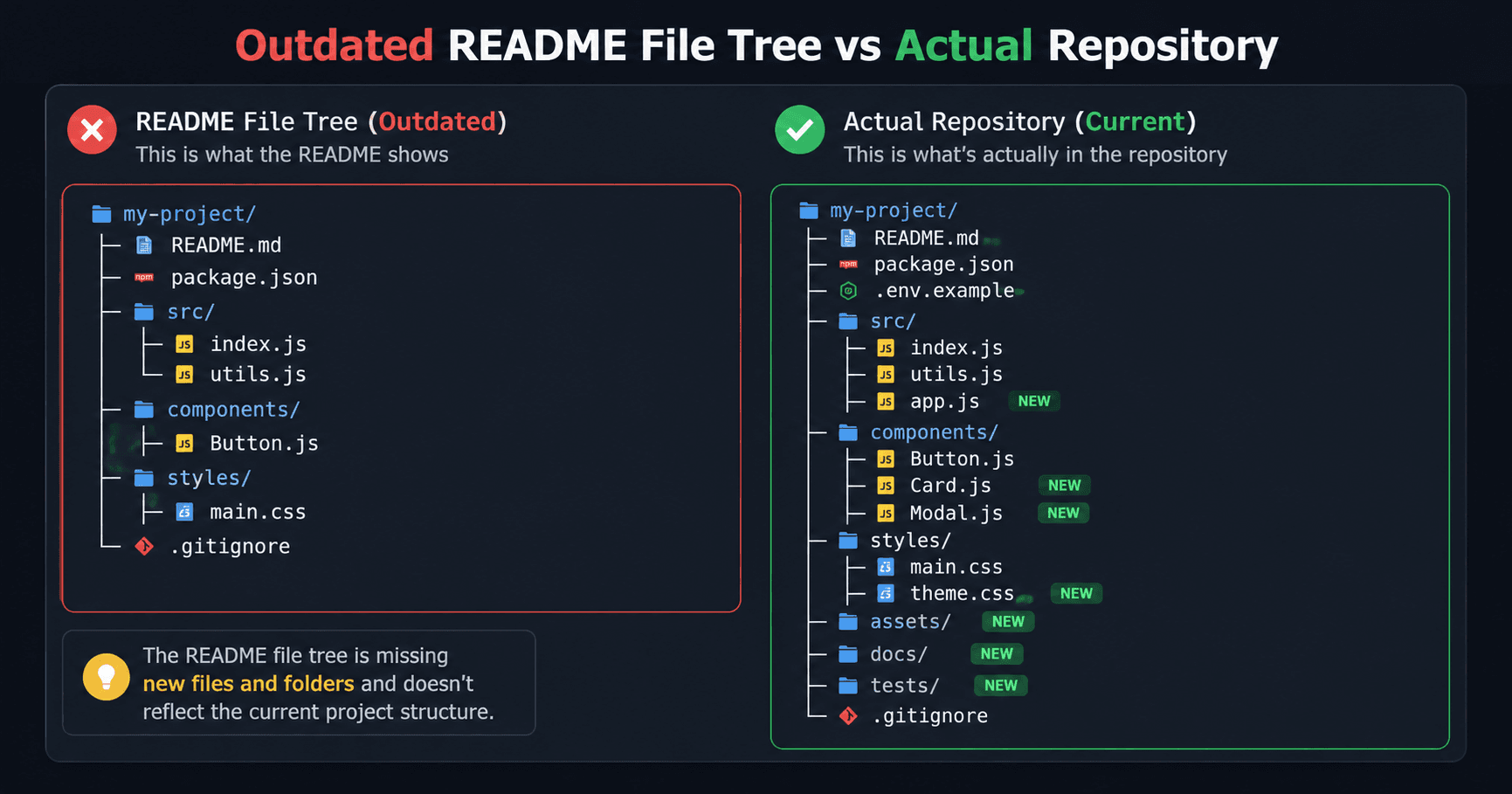
The more active the project becomes, the faster this problem grows. A README that was accurate a month ago can become completely wrong after a few updates.
That made me wonder whether there was a better way to keep a GitHub file tree updated without manually generating and pasting it every time something changed.
My README File Tree Was Already Wrong
The funny part is that I had the same problem in my own projects.
Whenever I needed a GitHub README file tree, I would generate one, paste it into the README, commit the changes, and move on.
Everything looked correct at that moment.A few weeks later I would add a new feature, create a new folder, move some files around, or remove code that was no longer needed. The project structure changed, but the file tree inside the README stayed exactly the same.
I usually didn't notice the problem immediately.One day I opened the repository and compared the README with the actual folders. The two were different.
The README showed folders that no longer existed. Some new directories were missing completely. Parts of the repository structure had changed, but the documentation had not.
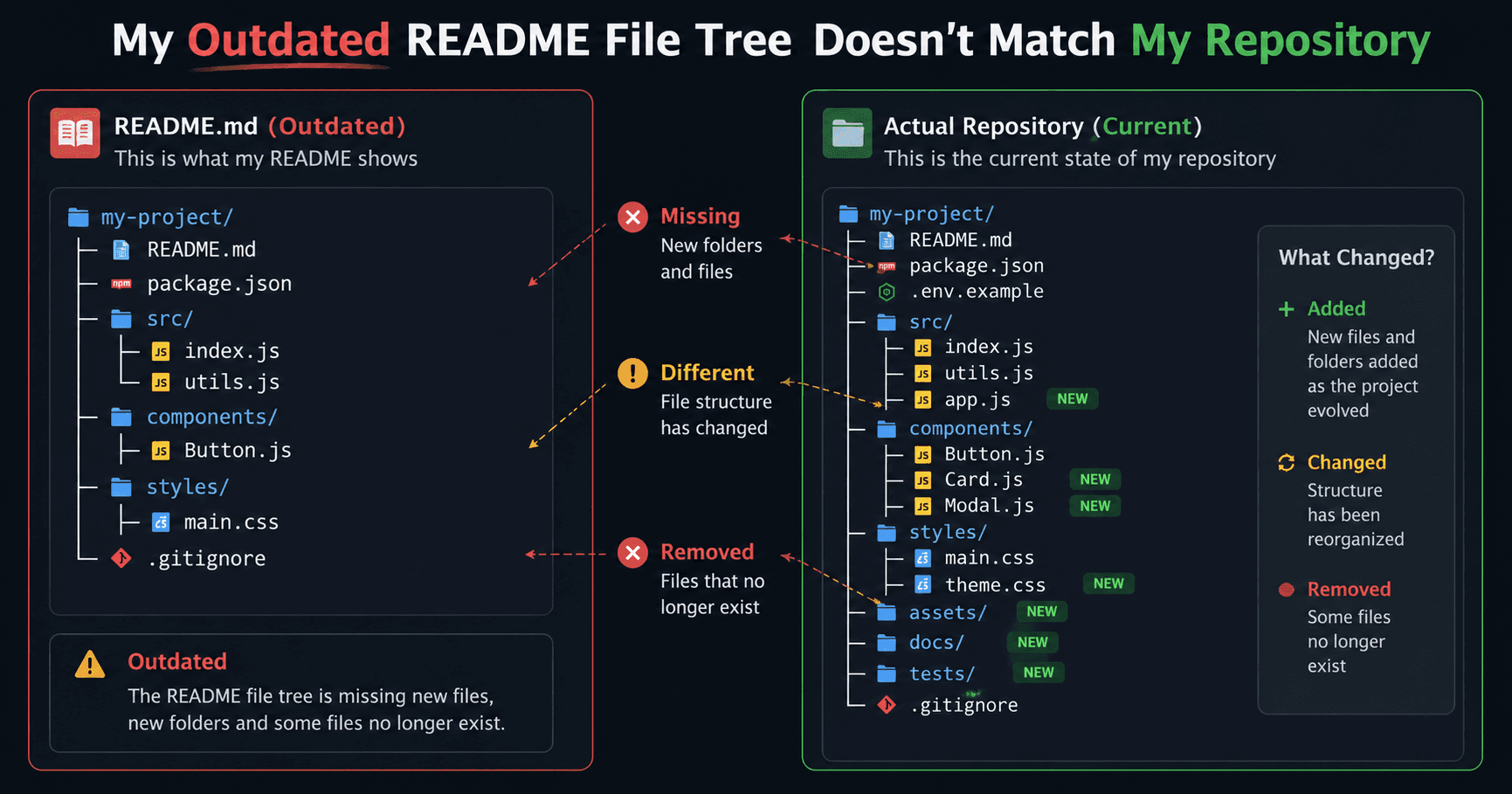
This is not a huge problem for a small project with only a few files. But for larger repositories, starter templates, and open-source projects, the file tree is often one of the first things people look at.
If the tree is outdated, new contributors get the wrong picture of how the project is organized.That is when I realized the issue was not the file tree generator itself. The real problem was that the generated tree was static.
Once it was pasted into the README, it stopped changing even though the project kept evolving.The more I thought about it, the more it felt like a problem that should not exist in the first place.
Why File Trees Go Out of Date So Quickly
After noticing the same problem in different repositories, I started paying attention to how it happens.Most of the time, nobody intentionally leaves an outdated file tree in a README. It happens naturally as the project grows.
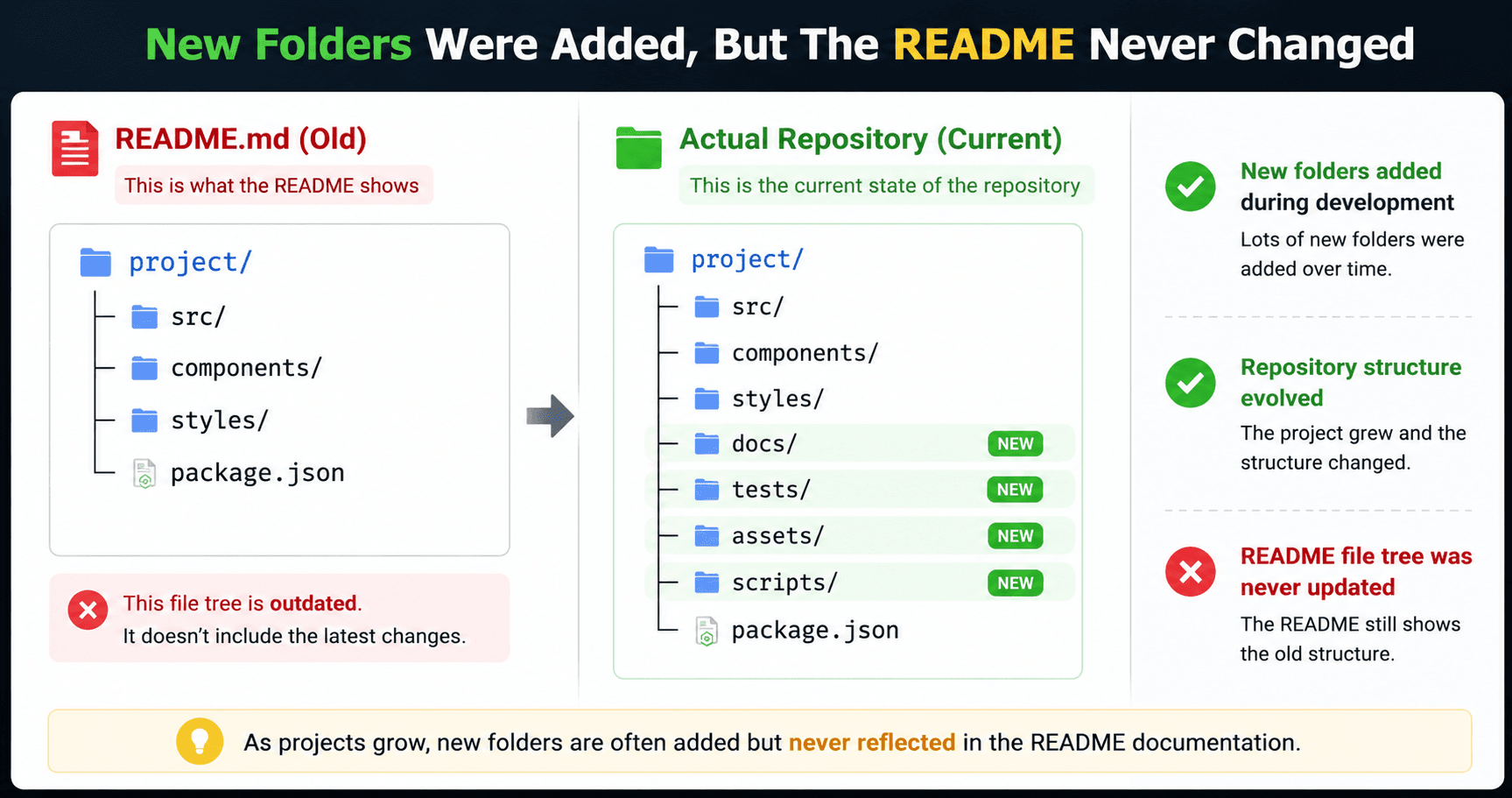
New folders get added
A project rarely stays the same for long.Maybe you add an api folder. Maybe you create a new components directory. Maybe you split one large folder into several smaller ones.
The actual project changes, but the GitHub file tree inside the README still shows the old structure.
Old files get removed
The opposite happens too.As projects mature, developers clean up code, remove unused files, and reorganize folders.
The repository becomes cleaner, but the README may still mention files that no longer exist.Someone reading the documentation tries to find those files and quickly realizes the tree is outdated.
The README never gets updated
This is probably the biggest reason.Most developers update code first and documentation later. Sometimes "later" never comes.
When a feature is finished, nobody wants to spend extra time regenerating a README file tree, copying it again, and committing another change.
So the old version stays there.After a few weeks or months, the difference between the README and the real repository structure becomes larger and larger.
The strange thing is that the project itself is usually fine. The problem is only the documentation.
A visitor sees the README first, so even a well-organized repository can look confusing when the file tree is no longer accurate.
The Hidden Problem With Static File Trees
At first, an outdated file tree does not seem like a big deal.
The project still works. The code is still there. Nothing breaks because a README was not updated.But after thinking about it more, I realized the problem is bigger than it looks.
They only show a snapshot
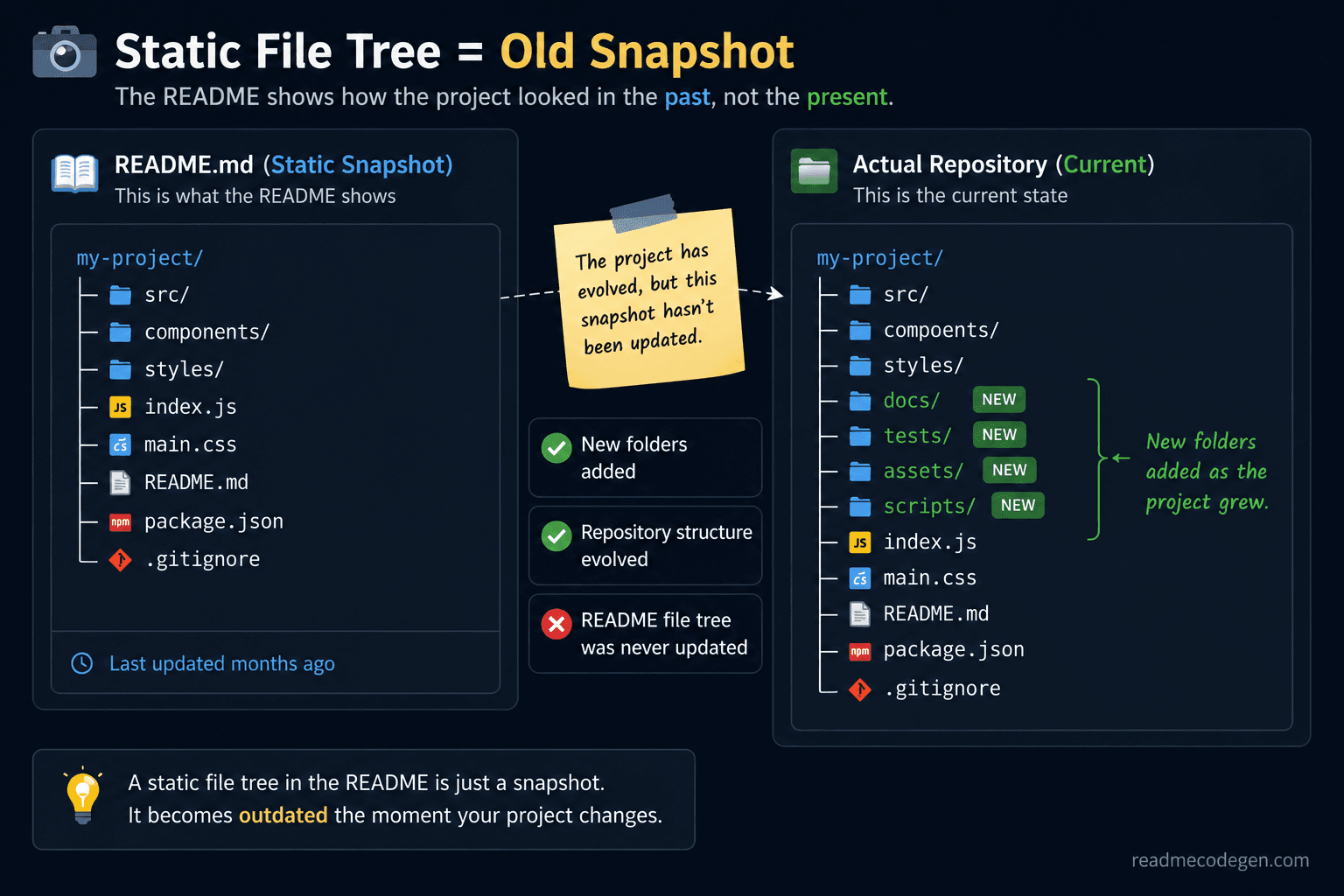
A static file tree is simply a picture of the project at one specific moment.The day it was generated, everything is correct. Every folder and file matches the repository perfectly.
The problem starts after the next commit.As soon as someone adds a folder, removes a file, or reorganizes the project, the tree starts getting out of date.The repository keeps moving forward, but the GitHub README file tree stays frozen in time.
They create extra maintenance work
Every time the project structure changes, someone has to remember to update the README manually.That means generating a new tree, replacing the old one, checking the formatting, and creating another commit.
For small projects, this might only take a minute.For active repositories that change every week, it becomes another task that developers usually forget.Most people would rather spend time building features than maintaining documentation.
Visitors trust the README first
When someone discovers a repository, they usually do not open random folders immediately.
They start with the README.The README is supposed to explain how the project is organized and where important files live.If the repository structure shown there is wrong, visitors can become confused before they even read the code.
New contributors may spend time looking for files that no longer exist.Developers evaluating the project may get an inaccurate picture of how everything is organized.
That is when I started asking a different question.
Instead of finding a better file tree generator, what if the file tree could update itself whenever the repository changed?
At first, an outdated file tree does not seem like a big deal.The project still works. The code still runs. Nothing breaks because a README was not updated.
But there is a hidden problem.
A static file tree only shows the project at one moment in time. The day it was generated, everything was correct. After that, the repository continued changing while the README stayed the same.That means the GitHub README file tree slowly becomes less accurate with every update.
New folders get added. Old files get removed. Directories get renamed. The actual repository structure changes, but the README does not.
How Most File Tree Generators Work
After noticing this problem, I started looking at different tools that generate file trees.Most of them follow exactly the same process.
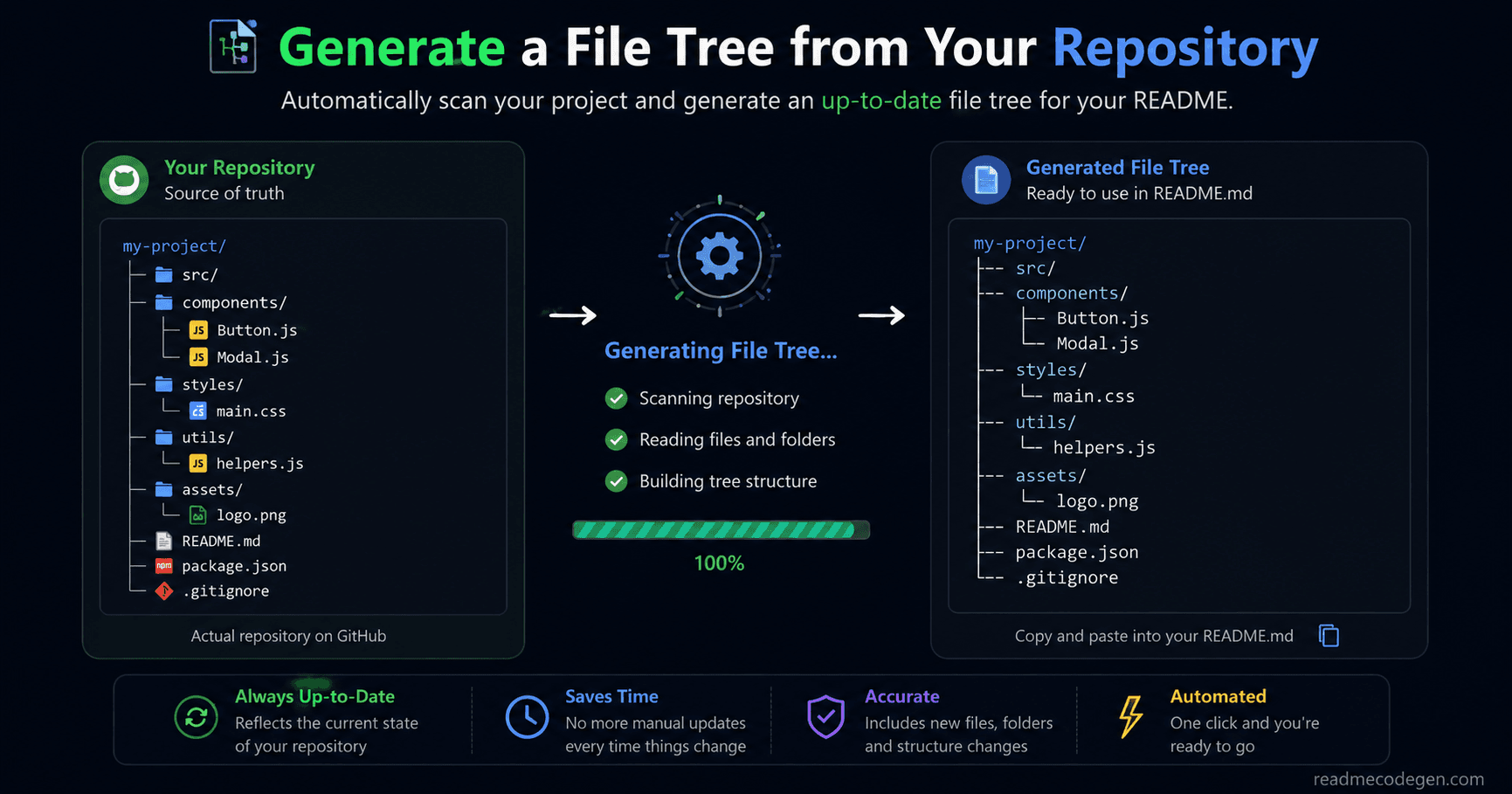
Generate the tree
You paste a project structure, upload files, or connect a repository.The tool scans the folders and creates a file tree showing how the project is organized.At this stage, everything is accurate because the tree is generated directly from the current project.
Copy the output
Once the tree is generated, you copy the result.Most tools provide the output in Markdown so it can be pasted directly into a README.
The process is quick and simple.Generate. Copy. Paste. That is why these tools are popular.
Paste it into the README
The next step is adding the generated tree to your documentation.
Now visitors can quickly understand the repository structure without opening every folder manually.
For new contributors, this can save a lot of time.
Then everyone forgets about it
This is where the real problem begins.The tree gets added to the README once and then nobody touches it again.
Weeks later, new features are added. Folders are reorganized. Files are deleted.The project keeps evolving, but the GitHub README file tree stays frozen.
Nobody notices immediately because the repository still works perfectly.The outdated tree only becomes obvious when someone compares the README with the actual project structure.
At that point, the documentation is no longer helping people understand the project. It is doing the opposite.That made me realize the issue was not with the generator itself. The real problem was that the generated tree was a static file tree. Once it was pasted into the README, it stopped updating forever.
So I started wondering if there was a way for a file tree to stay in sync with the repository automatically.
Looking for a Better Solution
At this point, I knew the problem was not difficult to understand.A GitHub README file tree becomes outdated because it is created once and never updated again.
The bigger question was how to fix it.
Updating it manually was not the answer
One option was simple.Every time the project changed, I could generate a new file tree and replace the old one inside the README.
That works in theory.In reality, most developers do not want another maintenance task.When you are busy building features, fixing bugs, or shipping updates, updating documentation is usually not the first thing on your mind.
Even if it only takes a minute, it is easy to forget.
I wanted something that stayed accurate
The more I thought about it, the more it felt strange.Modern projects automatically run tests. They automatically deploy code. They automatically check formatting.
But the README often depends on someone remembering to update it by hand. I wanted a solution that could stay accurate even when the project changed.
Something that would always reflect the current repository structure instead of showing an old snapshot from months ago.
The idea was surprisingly simple
Instead of generating a tree once and pasting it forever, why not generate it from the latest repository data whenever someone views it?
That way the tree would always match the actual project. No manual updates. No forgotten documentation. No outdated folders.
The README would always show the current structure of the repository.
At first, it sounded like a small improvement. But the more I explored the idea, the more I realized it could completely remove the biggest weakness of a static file tree.
That led me to an interesting question: Could a file tree update itself automatically whenever the repository changed?
Can a GitHub File Tree Update Itself?
After spending some time thinking about the problem, I realized I was asking the wrong question. I was focused on creating a better file tree generator.
What I should have been asking was whether the file tree needed to be generated only once at all.
Most README file trees are static
When you add a file tree to a README today, it is usually just plain text.GitHub displays it exactly as it was written.
That means the tree cannot see new folders. It cannot detect renamed files. It cannot update itself when the project changes.The moment it is pasted into the README, it becomes a static file tree.
The repository already knows the latest structure
The interesting thing is that GitHub already knows what the current project looks like.
Every folder. Every file. Every new commit.
The latest repository structure already exists.The problem is that the README is showing an old copy of that information.In other words, the repository is updated, but the documentation is not.
What if the tree came from live repository data?
That is when the idea started making sense.
Instead of storing the file tree directly inside the README, what if the tree was generated from the current repository whenever it was needed?
If a new folder appeared, the tree would show it.If a file was removed, the tree would disappear from the output automatically.The README would always display the latest version of the project instead of an outdated snapshot.
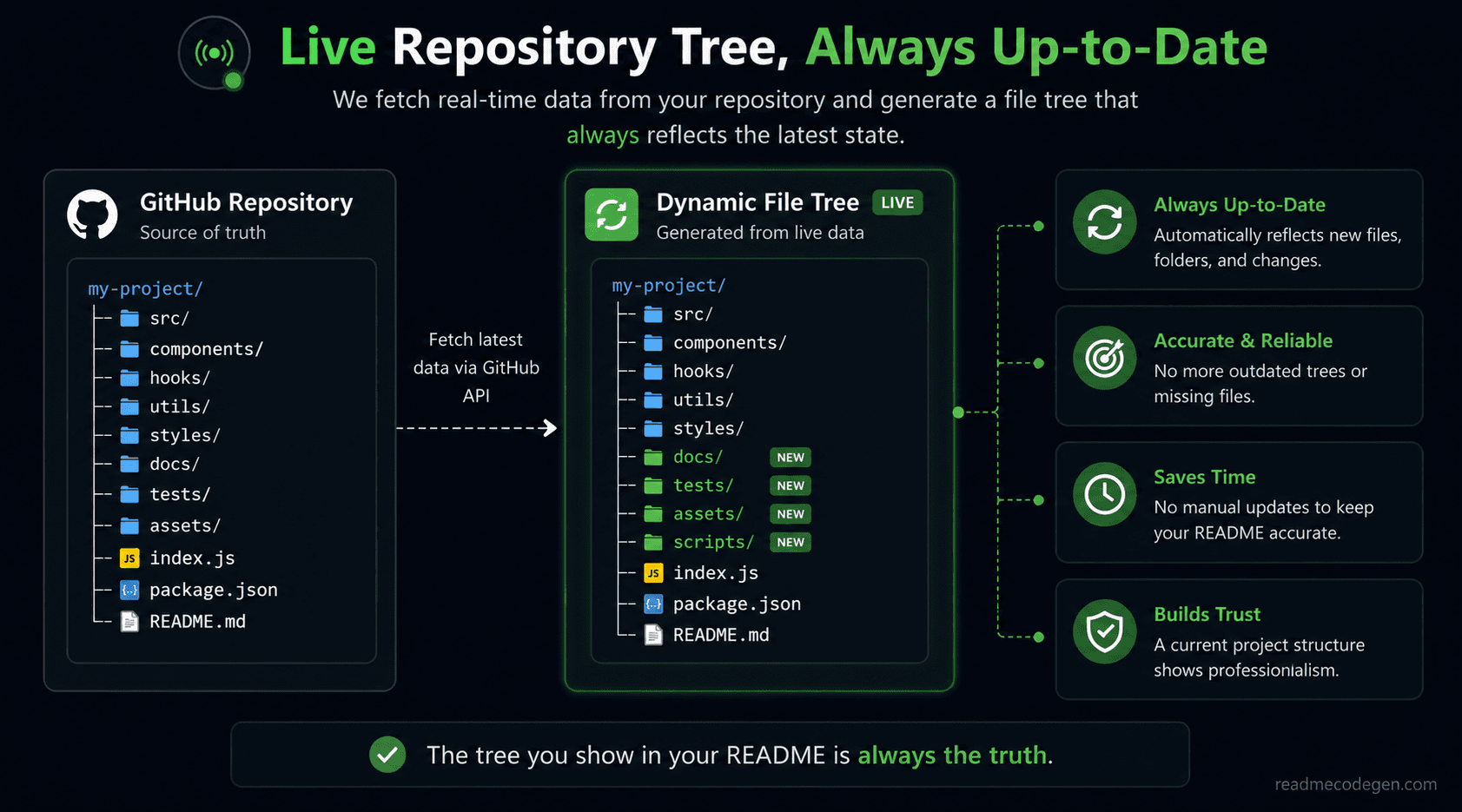
That is when the idea clicked
I was no longer thinking about generating a tree.I was thinking about keeping a GitHub README file tree synchronized with the repository itself.
Those are two very different problems.One creates documentation.The other keeps documentation accurate.And for active projects, accuracy is usually the harder problem to solve.
So I started experimenting with a different approach that could keep the README and repository moving together instead of drifting apart over time.
Building a Dynamic README File Tree
Once the idea clicked, the next challenge was figuring out how to make it work.I did not want another tool that generated a tree once and then became useless after the next repository update.
The goal was different.
I wanted the GitHub README file tree to stay connected to the actual project structure.
The first idea was simple
My first thought was to regenerate the tree every time somebody updated the repository.That sounded reasonable at first.
But then I realized it would require extra setup, extra automation, and extra maintenance.The solution was starting to become more complicated than the problem itself.
I wanted the README to stay clean
One thing I did not want was a huge block of generated code inside the README.Most developers prefer simple documentation that is easy to read and easy to maintain.
Adding complex scripts or workflows just to display a file tree did not feel like the right direction.The solution needed to be simple for the repository owner and invisible to the reader.
Using an image instead of plain text
That is when I started thinking about images.GitHub READMEs can display images from external URLs.
Instead of storing a text-based tree directly in the README, the README could display an image that is generated from the latest repository data.The README would stay the same, but the content inside the image could change whenever the project changed.
That was a much more interesting approach.
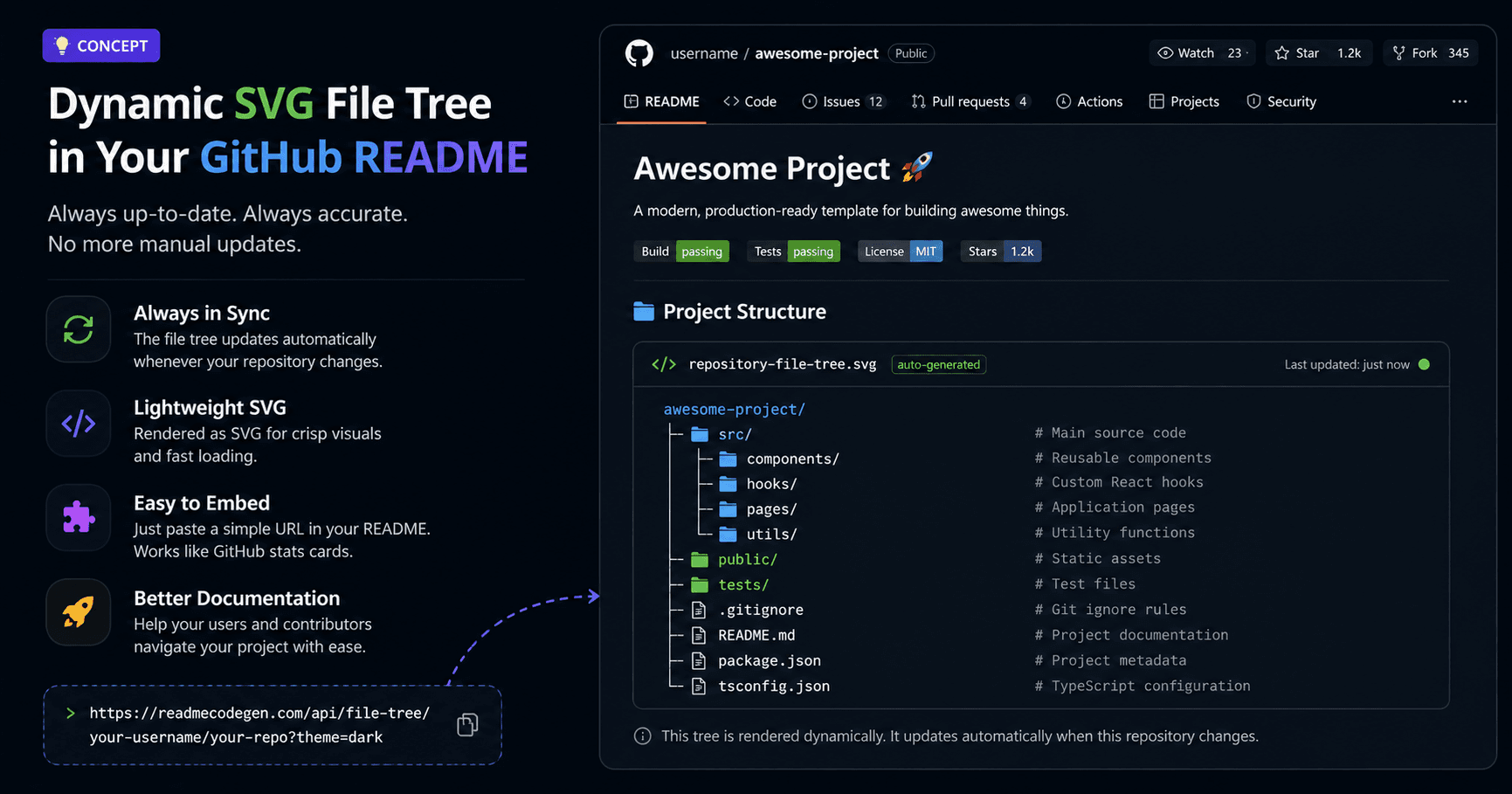
Why SVG felt like the right choice
I looked at different formats, but SVG stood out immediately.It stays sharp at any size.
It loads quickly.It works well inside a README.Most importantly, an SVG can be generated dynamically from the latest repository structure.
That means the visual tree can update while the README itself never needs to change.
The README becomes a window into the repository
This was the part that excited me the most.Instead of showing a snapshot from the past, the README could show what the repository looks like right now.
Add a folder and it appears.
Remove a file and it disappears.
Reorganize the project and the tree updates automatically.
The documentation and the repository stay in sync.
That solves the biggest weakness of a static file tree.
The information stays accurate without requiring developers to remember another task.
Static vs Dynamic File Trees
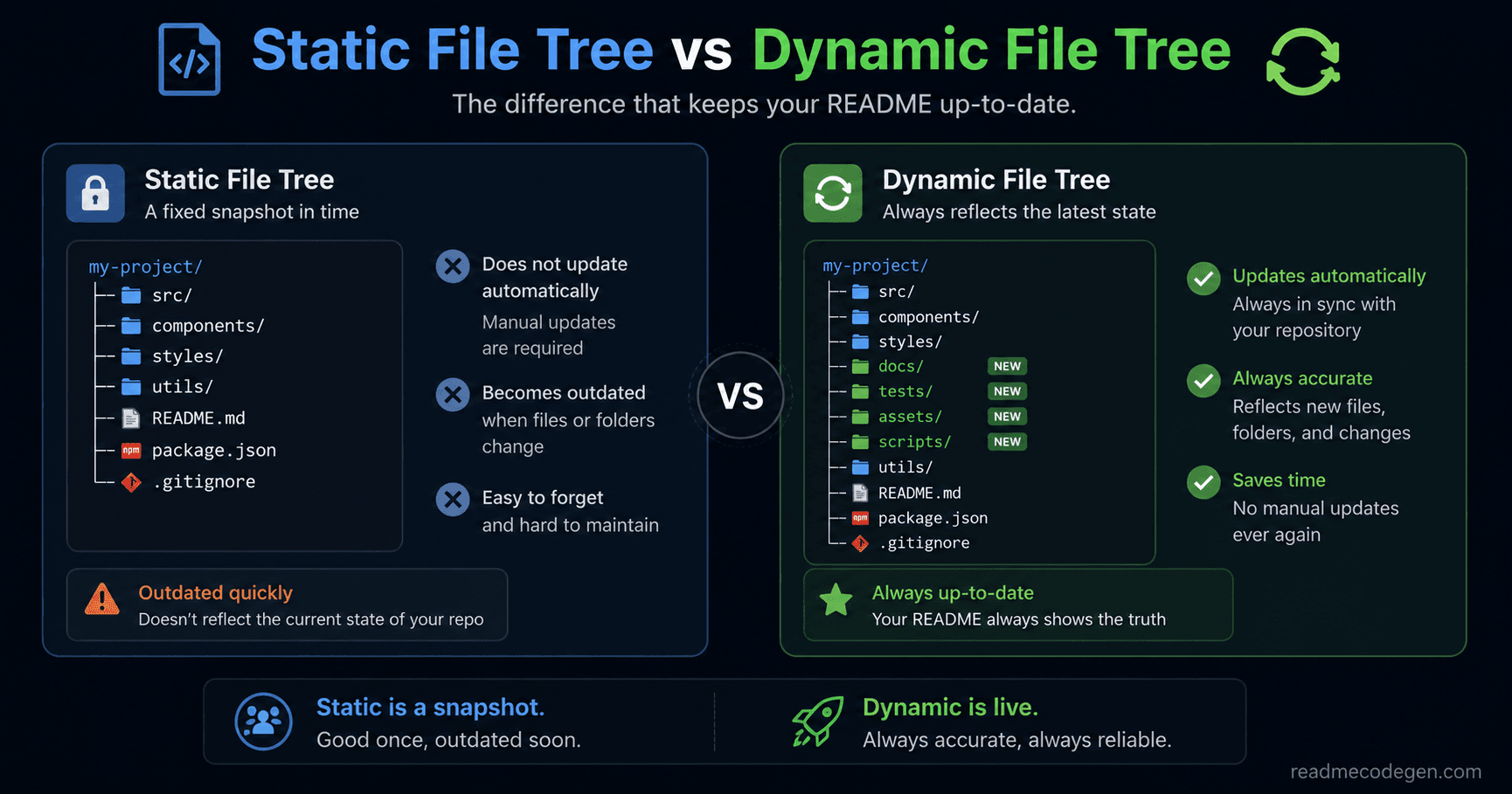
At this point, the difference became very clear.Both approaches solve the same problem.They help visitors understand a project's structure.The difference is what happens after the repository changes.
How a static file tree works
A static file tree is generated once and then pasted into a README.
It is simple, fast, and works for almost any project. The problem is that it starts getting outdated the moment the repository changes.Every new folder, renamed file, or deleted directory creates a gap between the README and the actual project.
To keep it accurate, someone has to regenerate the tree and update the README manually. That works for small projects, but it becomes easy to forget as the repository grows.
How a dynamic file tree works
A dynamic file tree follows a different approach.
Instead of storing the project structure directly in the README, it generates the tree from the latest repository data. The README stays the same, but the displayed tree can always reflect the current state of the project.
That means new folders appear automatically. Removed files disappear automatically. The documentation stays aligned with the repository.
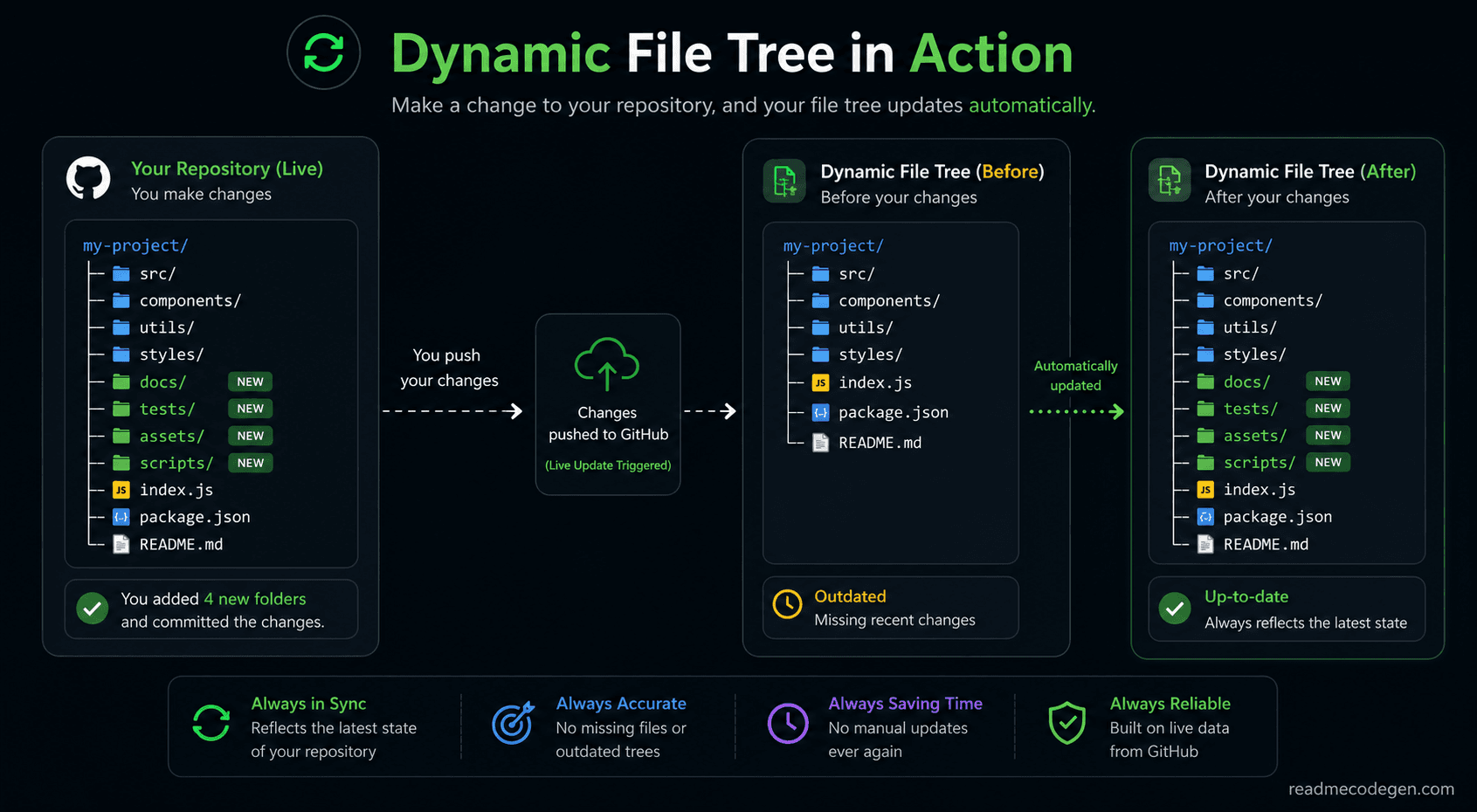
A simple comparison
Think about it like this.A static tree is like taking a photo of your project.The photo never changes, even if the project changes completely.
A dynamic tree is more like looking through a window.What you see updates as the repository evolves.
Neither approach is wrong
After experimenting with both approaches, I realized that neither one is inherently bad.A static tree is perfectly fine for projects that rarely change.
In fact, many repositories will never need anything more complicated.The challenge appears when a project is updated regularly.
That is where keeping the GitHub README file tree accurate becomes difficult.The more active the repository becomes, the more valuable automatic updates start to feel.
The real goal is accuracy
The most important lesson I learned was that the goal is not to generate a prettier tree.The goal is to keep the information accurate.
A beautiful file tree that is six months out of date is less useful than a simple one that reflects the current repository structure.
That is why I became more interested in keeping documentation synchronized than generating documentation in the first place.
When a Dynamic File Tree Actually Makes Sense
After spending time thinking about this idea, I realized something important.Not every project needs a dynamic file tree.For some repositories, a normal static tree is completely fine.The value depends on how often the project changes.
Open-source projects
Open-source repositories are probably the best example.
New contributors join. Features get added. Folders get reorganized. Pull requests change the project structure all the time.
In these situations, keeping a GitHub README file tree updated manually can become frustrating.A dynamic approach helps the documentation stay accurate without requiring extra work from maintainers.
Starter templates and boilerplates
Starter templates are another good example.People often visit these repositories specifically to understand the project structure before using them.
The file tree becomes one of the most important parts of the documentation.If the displayed structure is outdated, new users can become confused very quickly.
Keeping the repository structure accurate helps users understand where everything belongs.
Educational repositories
Many developers create repositories to teach concepts, frameworks, or programming languages.For these projects, the folder structure is often part of the learning experience.
Students use the file tree to understand how the project is organized.An outdated tree can make the learning process harder than it needs to be.

When you probably do not need it
On the other hand, some repositories hardly change at all.
Maybe it is a small personal project. Maybe it is a simple utility script. Maybe the structure has remained the same for months.
In those cases, a static tree is usually enough.There is nothing wrong with generating a tree once and leaving it there.The documentation will probably stay accurate for a long time.
The bigger the project, the bigger the benefit
What I noticed is that the benefits grow alongside the repository.A project with five files does not gain much from automatic updates.
A project with dozens of folders, contributors, and regular commits is a different story. That is where keeping the documentation synchronized becomes genuinely useful.
The goal is not to add complexity.The goal is to remove one more thing that developers have to remember.
And if a tool can keep a README accurate automatically, that is one less maintenance task for the repository owner.
We Already Use Dynamic Data in GitHub READMEs
The interesting thing is that this idea is not completely new.Many developers already use dynamic content inside their READMEs without thinking about it.
GitHub stats cards are a good example
If you have spent time on GitHub, you have probably seen profile READMEs showing statistics like total commits, stars, followers, or contribution graphs.
Those numbers are not manually updated every day.The cards fetch the latest data and generate the image automatically.That is why the numbers stay current even though the README itself never changes.
The same idea can work for file trees
When I thought about it that way, the concept became much easier to understand.A GitHub README file tree does not have to be static text
It can work just like a GitHub stats card.Instead of displaying commit counts or contribution numbers, it displays the current project structure.
The README contains a single image, but the content inside that image can be generated from the latest repository data.
The README stays the same
This is my favorite part.The repository owner does not need to keep replacing the file tree every time something changes.The README stays exactly as it is.
Only the displayed tree updates when the repository structure changes.Add a new folder and it appears.Remove a directory and it disappears.Rename a file and the tree reflects the change automatically.
Documentation becomes easier to trust
One reason people look at a README is to understand a project quickly.When the information is outdated, that trust starts to disappear.A dynamic file tree helps solve that problem because the documentation stays aligned with the actual repository.
Instead of showing what the project looked like six months ago, it shows what the project looks like today.That is the same reason GitHub stats cards became popular in the first place.Developers prefer information that updates itself over information that needs constant maintenance.
Final Thoughts
When I first started looking at this problem, I thought I was searching for a better file tree generator.What I eventually realized was that generating a tree was never the difficult part.
Keeping it accurate was.The problem appears later when the project grows. Almost every repository starts with good documentation.
New features are added. Folders are reorganized. Files are removed.
Meanwhile, the README often stays exactly the same.That is why so many repositories end up with an outdated GitHub README file tree.
What surprised me most was that developers have already solved similar problems before.
GitHub stats cards update automatically. Contribution graphs update automatically. Repository badges update automatically.
Nobody expects those numbers to be updated by hand anymore.The same thinking can be applied to project structure as well.Instead of treating a file tree as a screenshot from the past, it can become a live view of the current repository structure.
That means less maintenance, fewer mistakes, and documentation that stays useful as a project evolves.
Will every project need this?
Probably not.A small project with a stable structure may never have a problem with a static tree.
But for active repositories, open-source projects, starter templates, and educational projects, keeping documentation accurate becomes much more important.The more frequently a repository changes, the more valuable automatic updates become.
The idea is simple
Documentation should reflect reality.If a folder exists, it should appear in the tree.If a file is removed, it should disappear.People should not have to wonder whether the README is showing the current project or a version from months ago.
That is ultimately what led me down this path.Not because I wanted a prettier file tree.But because I wanted documentation that people could trust.
Try It on Your Own Repository
While writing this article, I checked some of my older repositories and noticed that several README file trees were already out of date. The projects had changed, but the documentation had not. If you maintain a GitHub repository, try comparing the file tree in your README with the actual folders in the project. You may find missing directories, renamed files, or sections that no longer exist.
It is a small detail, but it becomes more noticeable as a repository grows and changes over time.
What I am Working On Next
While researching this problem, I started thinking about a feature for ReadmeCodeGen. Right now, most README file trees are static. They look correct on the day they are generated, but slowly become outdated as the repository changes.
I am exploring whether it would be possible to let developers embed a dynamic file tree directly inside their README, similar to how GitHub stats cards display live data. Instead of showing an old snapshot, the tree could always reflect the latest repository structure. If you've used any of the tools on the tools page, you already know I'm always looking for ways to reduce manual work and keep documentation up to date.
I haven't built this feature yet and I'm still experimenting with different approaches. Before spending time developing it, I'd like to know whether developers would actually use something like this. If you have ideas, suggestions, or see problems with this approach, feel free to share them in the community. Many features on ReadmeCodeGen started from user feedback, and this might become one of them too.